Prerequisites: Complete Lab 1: Get Ready before starting this lab. You should have the Kosli CLI installed and an API key configured.

Learning goals

  • Understand the concepts of Flows and Trails
  • Create your first Flow using the CLI
  • Begin a Trail manually to track a process execution
  • Integrate Flow and Trail creation into your CI/CD workflow

Introduction

Kosli uses Flows and Trails to organize and track your software delivery processes:
  • A Flow represents a repeatable business or software process (like your CI/CD pipeline). It defines what you want to track and what compliance requirements must be met.
  • A Trail represents a single execution instance of that Flow. For example, each git commit creates a new Trail that tracks all activities for that specific change.
Think of a Flow as the template for your process, and Trails as individual instances that record what actually happened.

Exercise

1

Create a Flow manually

kosli create flow labs-pipeline \
  --description "CI/CD pipeline for labs application" \
  --use-empty-template

# Verify it was created
kosli get flow labs-pipeline
You should see output like:
Name:                labs-pipeline
Description:         CI/CD pipeline for labs application
Visibility:          private
Template:
                     version: 1
Last Deployment At:  N/A
Tags:                None
Visit app.kosli.com and navigate to Flows to see your newly created Flow.
The --use-empty-template flag creates a Flow without compliance requirements. In Lab 4, you’ll add a template with specific attestation requirements.
See kosli create flow for full flag reference.
2

Begin a Trail manually

A Trail represents one execution of your process. Create one using your latest git commit SHA:
# Run this inside your copy of the labs repository
kosli begin trail $(git rev-parse HEAD) \
  --flow labs-pipeline \
  --description "Manual trail for testing"

# Verify it was created
kosli get trail $(git rev-parse HEAD) \
  --flow labs-pipeline
Make sure you run this inside your copy of the labs repository, not the original.
The Trail name is the git commit SHA, which uniquely identifies this execution and lets Kosli connect all activities (builds, tests, deployments) for that specific commit.
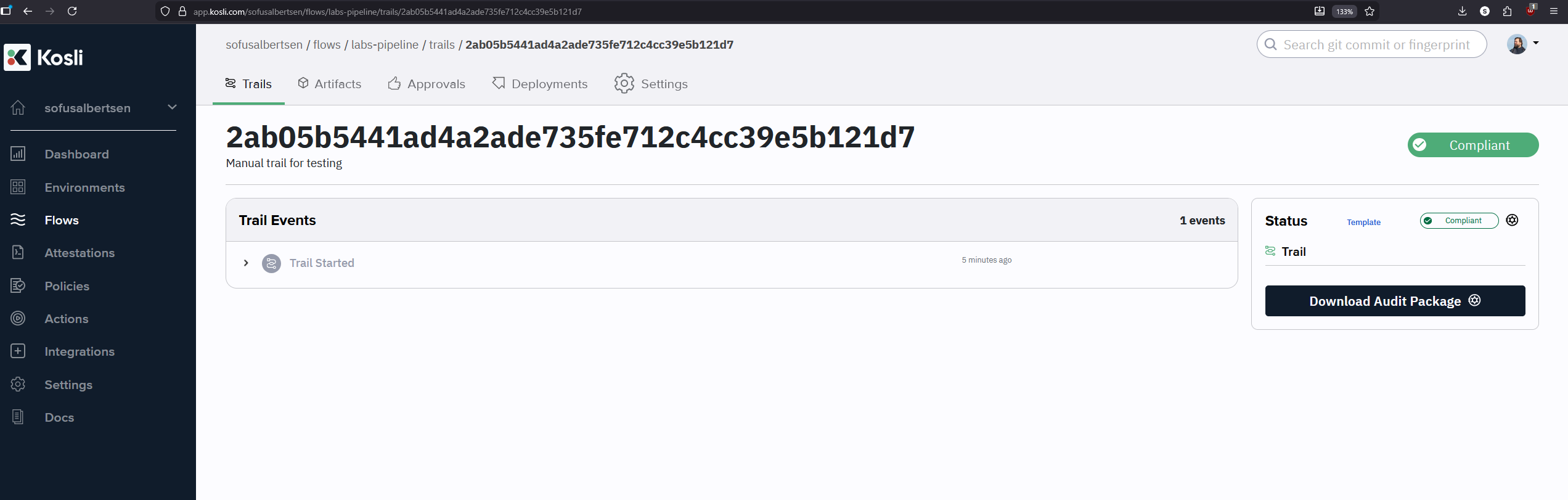
You can use any naming scheme for Trails (commit SHA, PR number, Jira ticket, etc.). Git commits are common because they’re unique and tied to your source code.
Kosli web interface showing the first trail under labs-pipeline
See kosli begin trail for full flag reference.
3

Explore trail immutability

Everything in a Kosli trail is immutable — updates are append-only. This is critical for compliance: if data could be changed, it could be tampered with.Run begin trail again on the same commit with a slightly different description:
kosli begin trail $(git rev-parse HEAD) \
  --flow labs-pipeline \
  --description "Manual trail for testing."
Now get the trail again:
kosli get trail $(git rev-parse HEAD) \
  --flow labs-pipeline
Notice the Events section shows both the original trail started event and a new trail updated event — the history is preserved, not overwritten.
4

Add Kosli secrets to GitHub

  1. In your repository, go to Settings → Secrets and variables → Actions
  2. Click New repository secret, name it KOSLI_API_TOKEN, and paste your API key
  3. Click Variables → New repository variable, name it KOSLI_ORG, and enter your GitHub username
Never commit API keys to your repository. Always use GitHub Secrets.
5

Update the GitHub Actions workflow

Open .github/workflows/full-pipeline.yaml and make the following changes:1. Add global environment variables at the top of the file:
env:
  KOSLI_API_TOKEN: ${{ secrets.KOSLI_API_TOKEN }}
  KOSLI_ORG: ${{ vars.KOSLI_ORG }}
  # ... other existing env vars ...
2. Add Kosli steps just after the actions/checkout step:
      - name: Clone down repository
        uses: actions/checkout@v4

      - name: Setup Kosli CLI
        uses: kosli-dev/setup-cli-action@v2
        with:
          version: 2.11.32

      - name: Create/Update Flow
        run: |
          kosli create flow ${APP_NAME}-pipeline \
            --description "CI/CD pipeline for ${APP_NAME} application" \
            --use-empty-template

      - name: Begin Trail
        run: |
          kosli begin trail ${GIT_COMMIT} \
            --flow ${APP_NAME}-pipeline \
            --description "Build ${BUILD_NUMBER}: ${GIT_BRANCH}"
The kosli-dev/setup-cli-action installs the CLI in CI. The global env variables authenticate all subsequent CLI calls automatically.
6

Push and verify

git add .github/workflows/full-pipeline.yaml
git commit -m "Add Kosli Flow and Trail steps"
git push origin main
In GitHub Actions, watch the workflow run and confirm the Setup Kosli CLI, Create/Update Flow, and Begin Trail steps complete successfully.Then visit app.kosli.com → your Flow → you should see a new Trail corresponding to your commit.

Verification checklist

  • KOSLI_API_TOKEN and KOSLI_ORG added to GitHub Secrets/Variables
  • Flow created manually via CLI
  • Trail created manually using a git commit SHA
  • Workflow updated with Kosli steps and runs successfully
  • Flow and Trails visible in the Kosli web interface
If anything didn’t go to plan, refer to the reference solution at pipelines/02-complete.yaml in the labs repository.

Next steps

Continue to Lab 3: Build Controls to attest artifacts and attach evidence to your Trails. Further reading:
Last modified on March 17, 2026